Free Online Discount Calculator, Percent Off, Stacked Deals and the Real Saving
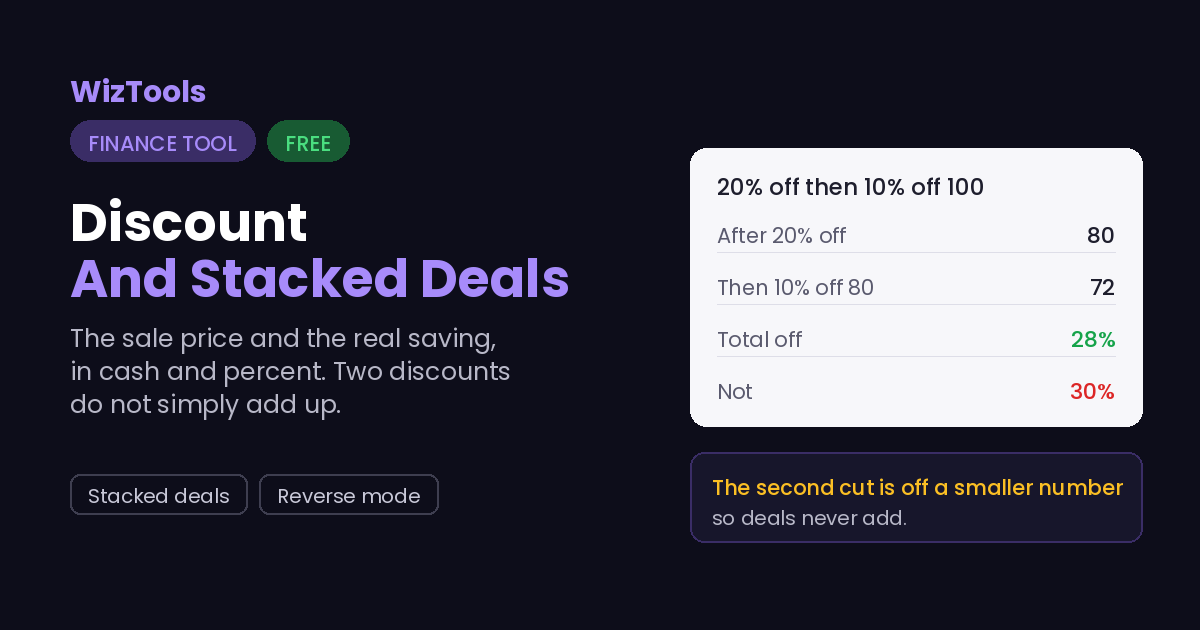
Find the sale price and what you actually save. Enter the price and the percent off to get the final price and the saving in both cash and percent. Stack a second discount, like an extra ten percent at the till, and see why two deals of twenty and ten come to twenty-eight percent off, not thirty.
Free Forever Nothing Uploaded Stacked Deals As You Type
Share this tool
Advertisement Slot (Top Banner)Google AdSense Unit • Responsive Banner
Discount CalculatorThe sale price, the saving, and stacked deals.
Everything is worked out in your browser. No number you type is sent anywhere, and there is no account.
The deal
Nothing is uploaded; every number stays in your browser.
$
%
%
For an extra deal taken off the reduced price at the till.
$
$
Result
The save button in the top bar keeps the numbers you have filled in, on this device only.
Numbers
Display
Size
Theme
Full screen hides the page around the tool. Press Escape, or the button in the bar, to come back.
History
Your data
Settings, history and saved setups live in this browser and nowhere else. There is no account and no server, which also means clearing them here is final.
Are you sure?
Buy Us A Coffee
Enjoying WizTools123? Help keep our server infrastructure
100% free and open for everyone.
Stacked discounts are the one bit of shop maths that catches almost everyone. Twenty percent off
a hundred leaves eighty. The extra ten percent is then taken off that eighty, not off the
original hundred, so it is eight, not ten. The final price is seventy-two, which is twenty-eight
percent off in total, not thirty.
This works the stack out step by step, so you can see where the extra percent went.
It also shows the total off as a single percentage, which is the number worth comparing
against a shop that simply offers that amount in one go. Two smaller deals always come to
less than their sum, and the more of them you stack, the wider the gap.
A big percent off a cheap thing can be less money than a small percent off an expensive one.
The percentage feels like the deal, but the cash saved is what leaves your pocket. The result
shows both, and the reverse mode goes the other way: give it the original and the sale price
and it tells you the real percentage, which is often smaller than the sticker claims.
Where Your Input Goes
Nowhere. And you can check that yourself.
Your prices are worked out in your browser and never sent anywhere.
It is all done by your own browser. Press F12, open the Network tab, and use the tool:
the page fetches its own code and nothing else. Or load the page, turn off your wifi, and
carry on. It still runs, because there was never a server in the middle.
How to Calculate a Discount
A few steps, and nothing is uploaded.
1
Pick what you knowA price and a percent off, or an original and a sale price to find the percent.
2
Enter the numbersNothing is uploaded; it all stays in your browser.
3
Add a second discount if anyFor an extra deal taken off the already reduced price.
4
Read the price and savingThe final price, the cash saved, and the true total percentage off.
What to Know About Discounts
Including the things this tool cannot do.
Stacked discounts never add up to their sum. A second percent comes off the already reduced price, so twenty then ten is twenty-eight off, not thirty. This works the stack step by step and shows the real total, which is the figure to compare against a single-deal shop.
The cash saved matters more than the percentage. A large percent off a cheap item can be less money than a small percent off a dear one. The result shows both, so you can judge the deal by what actually leaves your pocket rather than by the sticker.
The reverse mode finds the real discount. Give it the original and the price you paid and it tells you the true percentage off, which is often smaller than the sign claimed. Useful for checking whether a sale is as good as it looks.
This is arithmetic, not a price feed. It does not know any shop's prices and never fetches one. You type the numbers from the label and it does the sums, in your browser, with nothing sent anywhere.
Key Features & Capabilities
What this tool does, and what it deliberately does not.
Price and savingThe final price and the saving in both cash and percent.
Stacked dealsA second discount off the reduced price, worked out step by step.
Reverse modeFrom an original and a sale price to the real percentage off.
As you typeThe result updates while you edit.
History and savedRecent deals and named setups, on this device only.
Nothing uploadedYour numbers stay in the browser.
About the Discount Calculator
A discount looks like the easiest sum in the world until two of them are stacked or the percentage is playing tricks. This calculator does the plain case, the final price and the saving, and then the two that catch people out: discounts that stack, and working backwards from a sale price to the real percentage off.
Enter a price and a percent to get the sale price, the cash saved and the total off. Add a second discount and it shows each step, because the second cut lands on the already reduced price and never adds cleanly to the first. Switch to reverse and it takes the original and the sale price and tells you what the discount truly was.
It is only arithmetic. It does not know any shop's prices, fetches nothing, and gives no advice on whether the deal is worth taking; you read the numbers off the label and it does the maths in your browser. What it does insist on is honesty about the total, so a clever-looking stack of small deals is shown for the single percentage it really is.
Frequently Asked Questions
Why stacked deals do not add, and cash saved versus percentage.
Because the ten percent is taken off the price after the twenty percent has already come off, not off the original. So a hundred becomes eighty, then the ten percent off eighty is eight, giving seventy-two, which is twenty-eight percent off in total. Stacked deals always come to less than their sum.
The cash, usually. A big percentage off a cheap item can save less money than a small percentage off an expensive one. The result shows both so you can compare deals by what actually leaves your pocket.
It finds the real discount. Enter the original price and what you paid and it gives the true percentage off, which often turns out smaller than the sign claimed. It is the quick way to check a sale.
No. It never fetches a price from anywhere. You type the figures from the label and it does the arithmetic. That is the point: it is a calculator, not a shopping service.
No. Everything is worked out in your browser, with history and saved setups on this device only. You can confirm it in the Network tab or by working offline.