Free Online Bulk Passport and Visa Photo Resizer, Multiple Photos, Exact Country Sizes & DPI
Add one photo or the whole family at once and turn each ordinary picture into a passport or visa photo at the size the document actually asks for. Pick the country and the paper it is going on, place the crop box on the face, and download it at the exact pixel size with the real DPI written into the file.
Free Forever Nothing Uploaded 103 Countries Print Sheet
Share this tool
Advertisement Slot (Top Banner)Google AdSense Unit • Responsive Banner
Bulk Passport & Visa Photo Resizer
Nothing loaded yet
Drop your photo hereOne picture or the whole family. Each face gets its own crop. They are opened by your browser, not by a server.
Choose pictures No limit on how many • 40 MB each • nothing is uploaded
Click any picture to place its box on the face. The rest follow the settings on the right.
Country and document
mm
mm
DPI
Size
—
Pixels
—
Background
—
What this document asks for
Crop shape, for every picture
That is not a shape. Write it like 35:45.
A box that is not the document shape is placed inside the frame rather than squashed to fit.
Exact numbers, for every ticked picture
The box is —. On a picture too small to hold it,
it is trimmed to fit rather than sliding off the edge.
Turn and flip, for every picture
Straighten
degrees0
Turning by 90 degrees costs nothing. Any other angle has to throw the corners away.
The file
Quality out of 10092
KB
This colour goes behind see-through areas and around a crop that is not the document shape.
It cannot replace the wall in your photo.
Print sheet
Gap between copies mm
—
Make the photos first. Each one then has its own sheet button in the list below.
Add a picture to get started.
Ready to download
Photo
Made
Size
Everything together
—
Are you sure?
Crop this picture
Drag inside the box to move it, drag a corner to resize, or use the arrow keys.
Hold Shift for bigger steps.
This box is — and the document needs
—.
The box is smaller than that, so this one will be stretched up.
Shape
That is not a shape. Write it like 35:45.
Turn and flip
Straighten
degrees0
This document—
Buy Us A Coffee
Enjoying WizTools123? Help keep our server infrastructure
100% free and open for everyone.
Three numbers for one photo, and they are not the same number.
A passport office asks for millimetres because the photo gets printed and stuck onto a page.
A portal asks for pixels because it is checking a file. DPI is the bridge between the two:
it says how many pixels go into one inch of paper. Divide the millimetres by 25.4 to get inches,
multiply by the DPI, and you have the pixel size. That is the whole calculation, and it is the
one this tool does for you.
On paper
Density
In pixels
Where you meet it
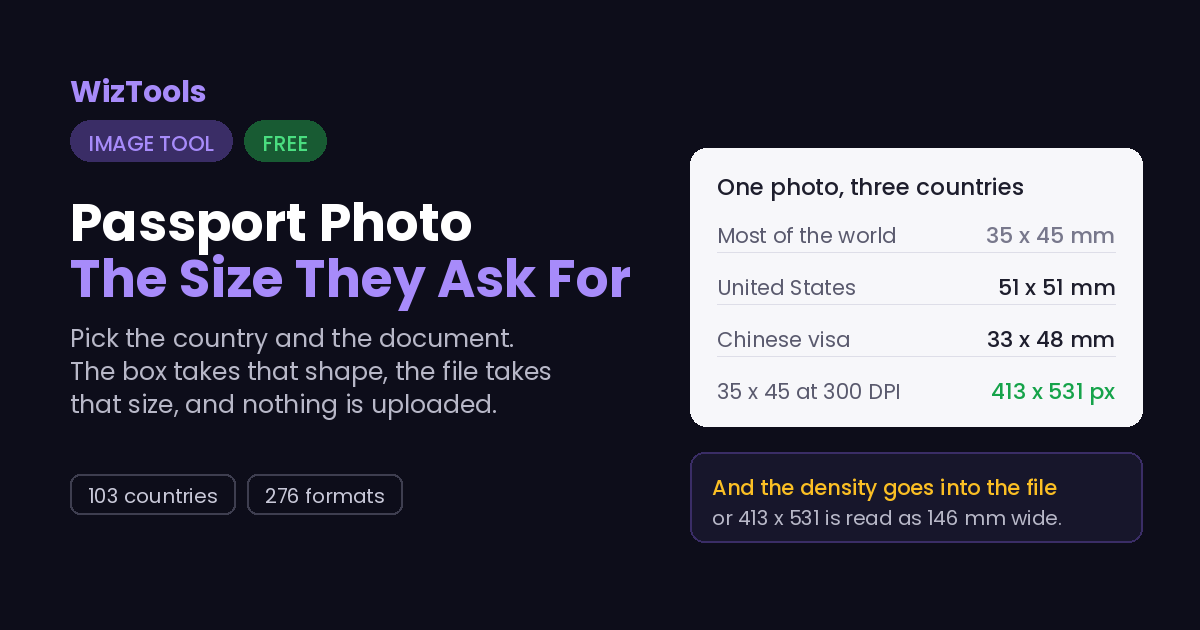
35 x 45 mm
300 DPI
413 x 531 px
Most of the world, including the Schengen area
35 x 45 mm
600 DPI
827 x 1063 px
Same photo, twice the detail, four times the file
51 x 51 mm
300 DPI
600 x 600 px
United States, square
33 x 48 mm
300 DPI
390 x 567 px
Chinese visa, its own shape
25 x 35 mm
300 DPI
295 x 413 px
Indian PAN card and a few other small formats
A photo can have the right pixels and still say the wrong size. Browsers write
72 DPI into every file they save, so a 413 x 531 photo claims to be 146 x 187 mm,
which is a postcard rather than a passport photo. The pixels are fine and the label is wrong.
This tool writes the real density into the file, so what the pixels say and what the header
says finally agree.
Where Your Photo Goes
Nowhere. And you can check that yourself.
Your face is the most identifying thing you own, and this page never receives it.
The picture is read by your browser, cropped on a canvas in your own tab, and written back
to your downloads folder. Press F12, open the Network tab, and make a photo: the page fetches
its own code and nothing else. Or load the page, turn off your wifi, and make the photo anyway.
It still works, because there was never a server in the middle.
That matters more here than on any other tool on this site. A passport photo is
submitted alongside your name, your date of birth and your document number. Sites that
resize it on their servers end up holding a face and, in the same session, everything
needed to attach a name to it. There is no account here, no upload, and nothing to delete
afterwards.
How to Make Passport Photos in Bulk
Four steps, and your original file is never touched.
1
Add one photo or manySelect multiple pictures at once, or drop in a single one. Everything is opened by your browser, so nothing leaves your device.
2
Pick the country and the documentThe list holds 276 formats across 103 countries: passport, visa, ID card, driving licence and residence permit. The crop box changes shape the moment you choose.
3
Place the box on the faceClick any picture to open it full size. Drag the box, turn the picture, straighten it, and the crop is saved for that one picture alone.
4
Download the photo, the sheet, or bothYou get the exact pixel size the document asks for, with the DPI written into the file. The print sheet puts as many copies as fit on one piece of photo paper.
What to Know Before You Submit
Including the things this tool cannot do.
This tool cannot change the background of your photo. It can only fill areas that are already see-through, and put your photo on a plain sheet. If the wall behind you is patterned, or there is a shadow on it, that shadow comes through the crop unchanged. A plain wall and even light are the part you have to get right with the camera.
Cropping never adds detail. A 35 x 45 mm photo at 300 DPI needs 413 x 531 real pixels. If the box you draw is smaller than that, the picture is stretched up to the size the document asks for, and stretched pixels look soft when they are printed. The page tells you when this is happening instead of quietly doing it.
The size is written into the file, not just into the pixels. JPEG carries its density in a small JFIF header at the front of the file, and PNG carries it in a pHYs chunk. Both are set to the DPI the document asks for, so a portal or a printer that reads the file properties sees 300 rather than the 72 that browsers write by default. PNG counts per metre rather than per inch, so a strict reader shows 299.9994 for 300; that is the format, not a mistake.
The measurements come from a public dataset, and a portal is still the final word. The specs here were collected from official government sources and are published under the MIT licence. Rules do change, and an embassy can ask for something the general spec does not mention, so it is worth a glance at the portal page before you upload.
No face detection runs here, and that is on purpose. Automatic head placement guesses, and a guess that is a few millimetres out is exactly what gets a photo rejected. You place the box yourself, on a picture shown at full size, which is slower for one photo and far more reliable.
Nothing is uploaded, including the photo of your face. The picture is opened, cropped and saved by your own browser. There is no server step in the middle, so there is no copy of your passport photo sitting in someone else's upload folder.
Key Features & Capabilities
What this tool does, and what it deliberately does not.
103 countries, 276 formatsPassport, visa, ID card, driving licence and residence permit, each with its own size and background colour.
Bulk: its own crop for each faceAdd multiple photos at once. Click any picture to open it full size and place the box yourself; the rest follow the settings you set once.
Print sheetEight copies on 4 x 6 inch paper, 32 on A4, with cutting lines, at the same DPI as the photo.
File size targetSome portals cap the upload. Set a size in KB and the quality is searched for until the file fits.
Nothing uploadedYour photo is opened and saved by your browser. It never travels to a server.
Real DPI in the fileThe density is written into the JPEG and PNG headers, not left at the browser default.
About the Bulk Passport & Visa Photo Resizer
You can do one photo or the whole family here: add multiple pictures at once and each face gets its own crop. A passport photo is not a picture that looks nice. It is a picture of an exact size, with a plain background, that a machine and a clerk both have to accept. The size is the part that is easiest to get wrong, because every country picked its own: 35 x 45 mm across most of Europe and Asia, a 51 x 51 mm square in the United States, and 33 x 48 mm for a Chinese visa, which matches nobody.
This tool holds those numbers so you do not have to look them up. Choose the country and the document, and the crop box takes the right shape, the output takes the right pixel size, and the background colour the document asks for is filled in behind anything see-through. The measurements come from an open dataset built from official government sources, and the exact requirement text for the document you picked is shown next to the crop.
The part it deliberately does not do is guess. There is no face detection deciding where your head should sit, and no attempt to cut you out of your background and paste you onto a white one. Both of those look impressive and both fail quietly in the ways that get photos rejected. What you get instead is your own crop, at the exact size, with the DPI written into the file, and a print sheet if you want the copies on paper.
The measurements come from the open passport-photo-specs dataset, which collects them from
official government sources and is published under the MIT licence.
Frequently Asked Questions
Everything worth knowing before you send the photo in.
The size, shape and DPI will be right for the document you chose. Whether the photo is accepted also depends on things a resizer cannot see or fix: the background, the lighting, your expression, glasses, head covering, and how recent the picture is. The requirements for the document you pick are listed on screen so you can check them yourself.
No, and it does not pretend to. It fills areas that are already transparent, and it puts your photo on a plain sheet for printing. It cannot separate you from the wall behind you. If the background is not plain, take the picture again against a plain wall in even light.
DPI only matters when the photo is printed. 35 x 45 mm at 300 DPI is 413 x 531 pixels, because 35 mm divided by 25.4 is 1.38 inches, and 1.38 inches at 300 dots per inch is 413 dots. The tool writes both: the pixel size, and the density inside the file so a printer or a portal reads the right physical size.
Yes. Set the size you need and the quality is searched for by halving the range until the file fits, usually in about eight tries. If even the lowest quality is still over your target, it says so rather than handing you a file that will be rejected.
Eight, at 35 x 45 mm with a 2 mm gap, laid four across and two down with the paper on its side. The same photo gives 32 copies on A4. A 51 x 51 mm US photo is large enough that only two fit on 4 x 6. The page works the number out for whatever you pick, and the sheet is built at the same DPI as the photo with thin cutting lines.
Yes. Add as many pictures as you like. Each one gets its own crop box, and the country, document and output settings apply to all of them. There is no limit on the number because the real limit is your device memory, and the page warns you when the batch gets large.
No. The picture is read, cropped and written by your browser. Nothing is sent to a server, there is no account, and closing the tab is all it takes to be rid of everything.
Every Other Image Tool
40 more tools in this set. All free, all in your browser.