WizTools123
Free Online Tools

Tool Categories


Video Tools New Tool

Free Online Video Thumbnail Maker at Exact Platform Sizes

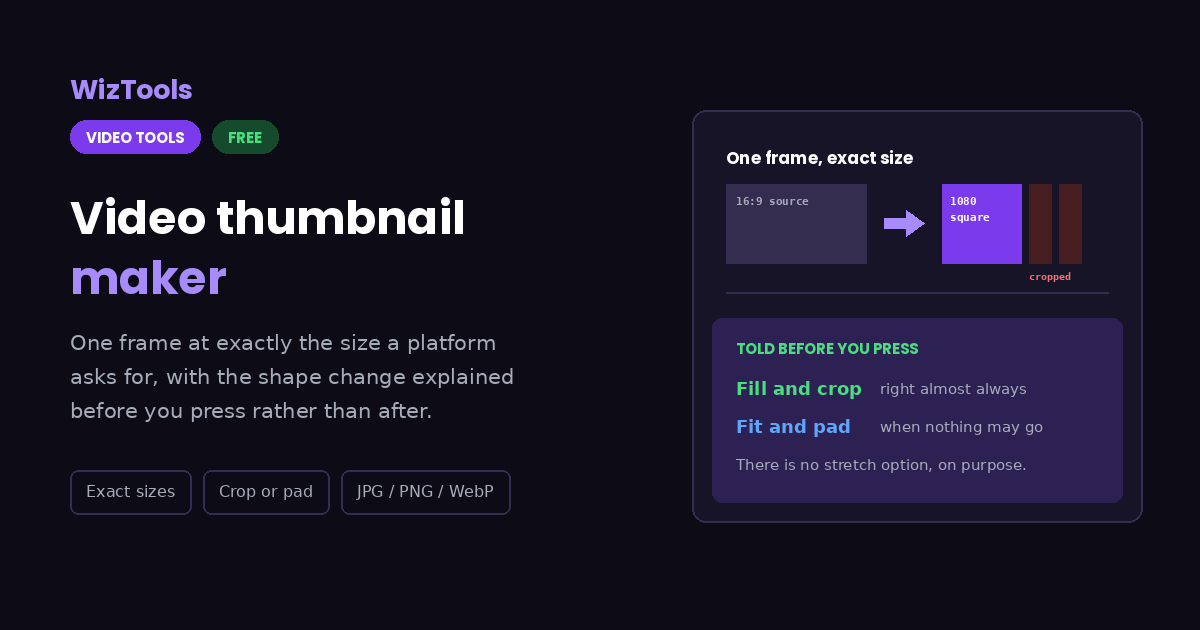
A thumbnail has to arrive at a size something else insists on, which means deciding what happens when your video is a different shape. This tells you which way the shape is about to change before you press, and offers no stretch option to get wrong.
Free Forever Nothing Uploaded Exact Sizes Crop or Pad
Free Online Video Thumbnail Maker at Exact Platform Sizes
Share this tool
Advertisement Slot (Top Banner) Google AdSense Unit • Responsive Banner
Make a thumbnail from a video Drag your video here, pick a moment, and get one picture at the size a platform asks for. Nothing is uploaded. Select a Video MP4, MOV, WebM, MKV, AVI and more • best under 300 MB • nothing is uploaded
0:00.000 / 0:00
One frame, at the right size
Follows the player until you type your own time.
Size
If the shape does not match
Save as

Output
.jpg

Your thumbnail

These files only exist in this tab. Save the ones you want before you close the page, because there is no copy of them anywhere else.

Buy Us A Coffee

Enjoying WizTools123? Help keep our server infrastructure 100% free and open for everyone.

Buy Us A Coffee
Sponsored Content (Below Tool) Google AdSense Placement

How to Make a Video Thumbnail

Pick the moment, pick the size, download one picture.

1
Drop your video in It plays in the page from your own disk, with no encoder to download first.
2
Find the frame Scrub the player and the time follows along. Type your own time and it stops following.
3
Pick the size you need Six common shapes, or the video's own size. The line below tells you whether that shape matches your footage.
4
Choose crop or bars Fill and crop is almost always right. Padding is there for the times nothing may be cut off.
5
Make it One picture, at exactly the size you asked for, ready to upload.

Getting a Thumbnail the Right Shape

Including the things this tool cannot do.

A 16:9 video cannot become a square thumbnail without losing something. Either the sides are cropped away or bars are added. The page tells you which is about to happen before you press, rather than letting you discover it afterwards.
Fill and crop is the right answer almost every time. A thumbnail with black bars looks like a mistake wherever it appears. Only choose padding when nothing in the frame may be cut off.
There is deliberately no stretch option. Squashing a picture to fit always looks wrong, and nobody chooses it on purpose. Leaving it out removes a way to make a bad thumbnail by accident.
JPG is the default because thumbnails are photographs. If the frame is mostly text or an interface, PNG keeps it crisp. WebP is smaller than both and every current browser opens it.
A thumbnail can only be as sharp as the frame it came from. Asking for 1920 by 1080 from a 480p video gives you a large blurry picture, not a detailed one.
The work happens on your own machine. Your video is opened by this page, not sent anywhere. That is why there is no upload bar, no queue and no waiting for a server. It is also why a big file leans on your own processor: nothing is being done for you somewhere else.
The first run downloads the engine, later runs do not. Video work needs a real encoder, and that is a thirty megabyte download the first time you press the button. Your browser keeps it, so the second video starts straight away.
Leave the tab open. All of the work is in this page, so closing it or navigating away stops the job halfway. On a phone, switching apps can do the same thing, because the system is allowed to pause a background tab.

Key Features & Capabilities

What this tool does, and what it deliberately does not.

Exact output sizes The picture comes out at precisely the dimensions you chose, not near them.
Crop or bars, your call With a plain sentence about what each one does to your frame, and no stretch option to get wrong.
The time follows the player Scrub to the moment and it is already in the box, until you decide to type your own.
It warns about the shape first If your video and the size you picked disagree, you are told before pressing rather than after.
No encoder download The frame comes straight out of the video your browser is already playing.
It cannot add sharpness A 1080p thumbnail from a 480p video is simply a larger version of a soft frame.

About the Video Thumbnail Maker

A thumbnail is not just a frame from a video. It is a frame that has to arrive at a particular size, because something on the other end insists on it. That is the difference between this page and the frame grabber here, which is built around landing on one exact frame and hands it back at whatever size the video happens to be.

Once a size is fixed, a decision appears that the frame grabber never has to make: what happens when your video and the size you need are different shapes. A sixteen by nine video cannot become a square picture without either losing the sides or gaining bars. The page tells you which of those is about to happen before you press the button, rather than letting you find out afterwards.

Cropping is almost always the right answer, and it is the default for that reason. A thumbnail with black bars down the sides reads as a mistake wherever it appears, however faithful it is to the original framing. Padding is there for the cases where nothing in the frame may be cut away, which do exist but are rarer than people expect.

There is deliberately no option to stretch the picture to fit. It would be easy to offer and it always looks wrong, and nobody chooses it on purpose. Leaving it out means one fewer way to produce a bad thumbnail by accident, which is worth more than the completeness of the menu.

Frequently Asked Questions

One frame, sized and shaped for where it is going.

The frame grabber is about landing on one exact frame and keeps the video's own size. This is about producing a picture at a size something else demands, which means deciding what happens when the shapes disagree.

Crop, nearly always. A thumbnail with black bars down the sides reads as a mistake wherever it is shown. Padding is only right when the whole frame genuinely has to survive.

Because a stretched picture always looks wrong and nobody picks it deliberately. Leaving it out is one fewer way to produce a bad thumbnail without meaning to.

No. Asking for 1920 by 1080 from a 480p source gives you a large soft picture. The detail is decided by what was recorded, and no resizing adds any.

JPG for filmed footage, which is most thumbnails. PNG if the frame is full of text or interface. WebP is smaller than both at the same quality and is opened by every current browser.

No. The frame is read from the video in your own browser and drawn onto a canvas there. Nothing leaves your device and no encoder is fetched.

Every Other Video Tool

76 more tools in this set. All free, all in your browser.

Advertisement Slot (Bottom Banner) Google AdSense Unit • Responsive Banner