


Free Online Forex Stop Loss Calculator, Price, Pips & Money at Risk
Place a stop loss on purpose rather than by feel. Work the level out from a distance in pips, from the money you are willing to lose, or from a percentage of the account, and see all three together for a long or a short so the numbers cannot quietly disagree.
Broker and instrument assumptions
🛑 Stop loss calculator
Stop-loss price, distance, risk and loss.
Set the pair, direction, entry and stop at the top of the app. This tab shows the stop-loss price, the distance in pips, the risk amount, the potential loss and the risk percentage, all from the same engine.
🎯 Stop-loss price
The price from a distance in pips.
The stop-loss price for your entry, direction and stop distance.
📏 Stop-loss distance
The distance in pips from a price.
The stop-loss distance in pips, points and pipettes from the entry and stop price.
⚖️ Risk-based stop loss
Max stop distance for a set risk.
The maximum stop distance that keeps the loss at your chosen risk, so max SL pips = risk amount ÷ pip value.
🟢 Long trade stop
Stop below the entry for a buy.
Stop-loss for a buy position, always below the entry.
🔴 Short trade stop
Stop above the entry for a sell.
Stop-loss for a sell position, always above the entry.
💰 Risk amount
Risk in money from percent or fixed.
The money at risk, the account balance times the risk percentage, or the fixed amount you set.
💵 Pip value
Per position and per lot, mini, micro.
Pip value for your position, and per standard, mini and micro lot for the pair.
📐 Position size from stop
The size that keeps risk on target.
The position size that keeps the loss at your risk if the stop is hit, so size = risk ÷ (SL pips × pip value per unit).
💸 Trading costs
Spread, commission, swap and total.
Spread, commission, swap and other costs that add to the price risk.
🎯 Take-profit
Target price, pips and profit.
The take-profit target, its distance in pips, and the potential profit, further from the entry in the winning direction.
⚖️ Risk / reward
Risk, reward and the ratio.
Risk and reward in pips and money, and the risk/reward ratio. Stop comes from the top of the app.
📋 Multiple trades
Portfolio risk across positions.
Pick the position sizes you are running in this pair. Each uses the current entry, stop and costs, and the gross and total risk are shown per size and as a portfolio total against your balance.
| Lots | SL pips | Gross risk | Total risk | Risk % |
|---|
📊 Scenario analysis
Risk across stop distances or percents.
Two tables from your current trade: how risk and position size change across stop distances, and across risk percentages. Neither is a recommendation.
| Stop | Risk amount | Position | Units | Risk % |
|---|
| Risk % | Risk amount | Max SL pips | Position |
|---|
| When | Calculator | Result | Actions |
|---|
Number formatting
Rounding only changes what you see; the arithmetic keeps full precision, and a value within tolerance of zero shows as $0.00.
Appearance
History
Your data
Settings, history, saved setups and any custom pairs are stored only in this browser. Nothing is uploaded, and this tool has no field for a trading login, a broker password or an API key. Never type one into any calculator.
Enjoying WizTools123? Help keep our server infrastructure 100% free and open for everyone.
How to Set a Forex Stop Loss
Five steps, and none of them involve a server.
Direction decides which side the stop sits on — below the entry for a long, above for a short. The entry price and pip size come from your platform.
A percentage of the balance or a fixed amount. This one number anchors the whole trade: the risk amount, the loss and the position size all tie back to it.
Give the stop as a price, a distance in pips, or the risk amount you will accept. The tool fills in the other two, always on the correct side of the entry.
The stop distance times the pip value is the potential loss; against the balance it is the risk percentage; against the risk it gives the position size.
Spread, commission and swap are shown apart from the price risk to give a total estimated risk, and the exact position size is shown next to the tradeable rounded one.
From Risk to Stop to Size
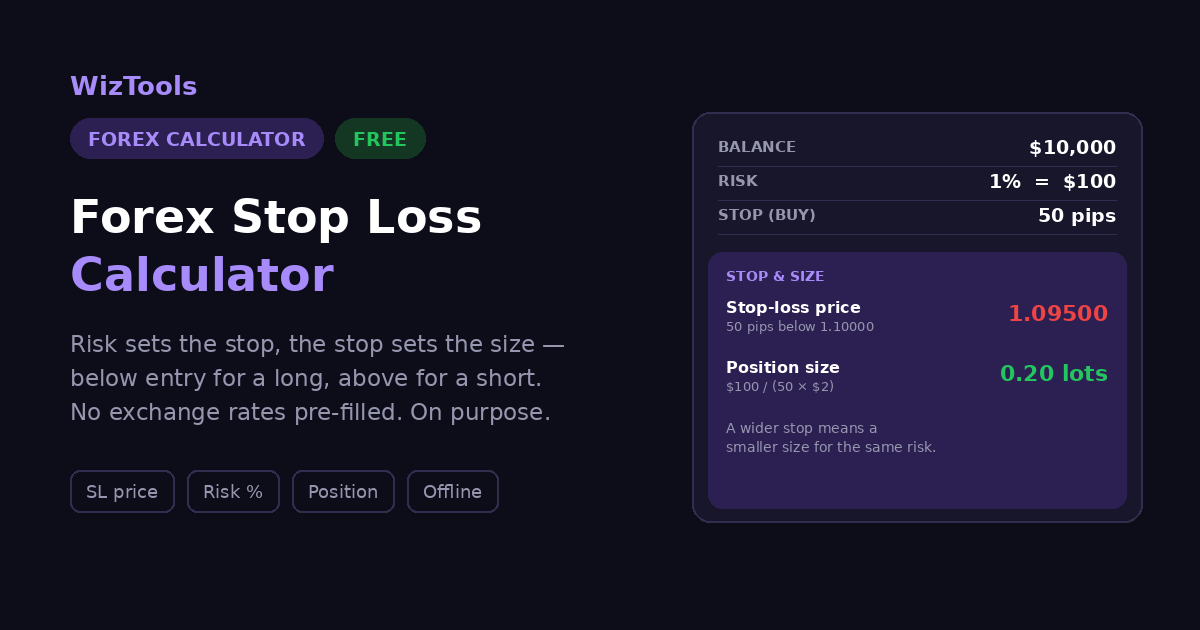
A $10,000 account, 1% risk, EUR/USD long at 1.10000.
| Step | Value |
|---|---|
| Risk amount ($10,000 × 1%) | $100.00 |
| Stop-loss price (50 pips below entry) | 1.09500 |
| Stop distance (1.10000 − 1.09500) | 50 pips |
| Pip value (0.20 lots) | $2.00 / pip |
| Potential loss (50 × $2) | −$100.00 |
| Risk % ($100 ÷ $10,000) | 1.00% |
The stop sits below the entry because this is a long, and a stop above it would be a mistake, not a small risk, and the tool flags that inline. Turn the arithmetic around and the position size falls out: at $100 of risk over a 50-pip stop, the size that keeps the loss on target is 0.20 lots. A wider stop would mean a smaller position for the same risk, and trading costs are added on top of the gross loss to give a total estimated risk, and never blended in silently.
How Many Pips Should Your Stop Be?
The same 100 of risk on EUR/USD, at six stop distances. Every row loses the same amount if the stop is hit.
| Stop distance | Position size | Position value | If the stop is hit | An ordinary 15-pip wobble |
|---|---|---|---|---|
| 10 pips | 1.00 lots | 110,000 | 100.00 | 100.00 and you are already out |
| 20 pips | 0.50 lots | 55,000 | 100.00 | 75.00 |
| 30 pips | 0.33 lots | 36,667 | 100.00 | 50.00 |
| 50 pips | 0.20 lots | 22,000 | 100.00 | 30.00 |
| 75 pips | 0.13 lots | 14,667 | 100.00 | 20.00 |
| 100 pips | 0.10 lots | 11,000 | 100.00 | 15.00 |
The fourth column never changes. Every row loses exactly
100.00 if the stop is hit, because the position size was
worked out from the stop rather than chosen first. That is the whole idea, and it is why "how many pips
should my stop be" has no single answer: the stop distance is not what sets your risk. It is what sets
your size.
Now read the second and last columns together, because that is where the tight-stop appeal falls apart. A
10-pip stop gives you
1.00 lots, which sounds attractive until an
ordinary 15-pip move against you takes the entire
100.00 and closes the trade. The
100-pip stop holds
0.10 lots and the same wobble costs
15.00 on paper, with the position still open.
A tight stop is not a safer stop. It is a bigger position that gets closed more often.
So where should the stop actually go? At the price where your reason for the trade stops being
true, which is a chart question this calculator cannot answer and will not pretend to. Below the swing
low, past the level, outside the range the pair normally moves in during your session. Once you have that
price, put it in above and the position size follows. Picking a round number of pips first and hoping the
chart agrees is doing it in the wrong order, and it is why so many correct trades get stopped out before
they work.
The Formulas, With Worked Numbers
EUR/USD, a $10,000 account, a 50-pip stop.
| What | Formula | Worked example |
|---|---|---|
| Risk amount | Risk = Account balance × Risk % | $10,000 × 1% = $100 |
| Long stop distance | Distance = Entry − Stop loss | 1.10000 − 1.09500 = 0.00500 |
| Short stop distance | Distance = Stop loss − Entry | 1.10500 − 1.10000 = 0.00500 |
| Stop-loss pips | SL pips = Distance ÷ Pip size | 0.00500 ÷ 0.0001 = 50 pips |
| Potential loss | Loss = SL pips × Pip value | 50 × $2 = $100 |
| Risk percentage | Risk % = Loss ÷ Balance × 100 | $100 ÷ $10,000 × 100 = 1% |
| Long stop-loss price | SL price = Entry − (SL pips × Pip size) | 1.10000 − 50 × 0.0001 = 1.09500 |
| Short stop-loss price | SL price = Entry + (SL pips × Pip size) | 1.10000 + 50 × 0.0001 = 1.10500 |
| Max stop pips for a risk | Max SL pips = Risk amount ÷ Pip value | $100 ÷ $2 = 50 pips |
| Position from stop | Units = Risk ÷ (SL pips × Pip value/unit) | $100 ÷ (50 × $0.0001) = 20,000 |
| Risk / reward | Ratio = Reward pips ÷ Risk pips | 100 ÷ 50 = 1 : 2 |
Things Worth Knowing
The assumptions behind every number on this page.
What This Calculator Does
And, just as importantly, what it refuses to assume.
The stop sits below the entry for a long and above for a short, and a stop on the wrong side is flagged inline, not turned into a misleading distance.
Define the stop however you think about it — a price, a distance in pips, or the money you will risk, and the other two follow from the same engine.
Position size is the risk amount over the stop distance and pip value, so the trade stays inside the risk you chose. A calculation, never a recommendation.
Spread, commission and swap are added separately, so gross risk and total estimated risk are always shown side by side rather than mixed silently.
Exact and lot-step-rounded position sizes together, with whether the rounded size leaves the risk below, at, or above your target.
No account, no upload, no live feed. Settings, history and saved setups live in this browser and nowhere else.
About the Forex Stop Loss Calculator
A stop-loss is the price at which you accept a trade has not worked and close it. Setting one well is less about the price than about the money: how much of the account is at risk, how far the stop is from the entry, and what size the position has to be so that those two agree. This calculator ties all three together, so a stop is never just a line on a chart but a known amount of money at a known distance.
The arithmetic runs in one direction and back. Forward: the risk amount is the balance times the risk percentage; the stop distance in pips is the price gap divided by the pip size; the potential loss is that distance times the pip value; and the risk percentage is the loss over the balance. Backward: fix the risk and the stop, and the position size falls out as the risk divided by the stop distance and the pip value. Every tab draws on the same engine, so the numbers agree across the whole module.
Direction is where stop-loss maths most often goes wrong, so the tool is strict about it. A long trade loses as the price falls, so its stop sits below the entry; a short trade loses as the price rises, so its stop sits above. A stop placed on the wrong side is flagged inline rather than turned into a positive-looking distance, because a stop above the entry on a long is not a small risk. It is a mistake.
Costs are kept honest and separate. The stop distance gives the gross loss, and spread, commission and swap are added on top to give a total estimated risk, each with a toggle so you can see its effect. Gross and total are never blended silently, and when a risk percentage is shown it is always clear which of the two it rests on. Pip value is treated as a real input rather than an assumed $10, and where the account and quote currencies differ, a conversion rate is asked for instead of invented.
Position sizing comes with its rounding shown. Brokers trade in lot steps, so the exact size from the risk calculation rarely lands on a tradeable one; the tool shows the exact and the rounded size together and says whether the rounded size leaves the risk below, at, or above target. Around the core sit the tools that use it — take-profit and risk-reward, a portfolio view across several trades, and scenario tables over stop distances and risk percentages.
What the tool does not do is fetch a live price or rate, assume a broker's costs, or recommend a trade, a stop, a size or a risk level. It works out the stop, the loss, the risk and the size from the numbers you enter, keeps the stop on the correct side of the entry, and shows its working.
Frequently Asked Questions
The questions that come up most often about forex stop-losses.
Other Tools You Might Need
Every Other Forex Tool
21 more tools in this set. All free, all in your browser.