


Free Online vCard QR Code Generator for Digital Business Cards
Fill in as much of a contact card as you need and get a QR code that saves it straight into a phone book. The page shows how much the code is carrying as you type, because a fully filled card makes a pattern too fine to print on a business card. Nothing is uploaded.
A complete contact card. One scan saves your name, company, phone, email and address straight into their phone book.
Need more than one kind of code? The all in one generator has all twelve types on a single page, and keeps your colours, logo and frame when you switch between them.
Scanners read contrast, not colour. Keep dark dots on a light background, because reversing it stops many phones from scanning.
Finish
Gradient and frame, for posters and table tents.Enjoying WizTools123? Help keep our server infrastructure 100% free and open for everyone.
Why Free QR Codes Expire, And Why These Do Not
The one thing worth understanding before you print anything.
| Static (this tool) | Dynamic (most free sites) | |
|---|---|---|
| What is inside the code | Your actual data | A short link to their server |
| If the company shuts down | Still works | Every printed code stops working |
| If they start charging | Nothing changes | The code can be switched off |
| Change the destination later | No, print a new one | Yes, this is the real advantage |
| Who sees who scanned it | Nobody | They do, with scan tracking |
| Works with no internet | For WiFi, vCard, text yes | Never, the link must resolve |
So the honest summary is this. If you need to change where a code points after it has been printed, or you need to count scans, you want a dynamic code and you should accept that it depends on a company staying in business. For everything else, which is most posters, menus, business cards, WiFi signs and product labels, a static code is the safer choice, because there is nothing in the middle that can fail.
How to Make a vCard QR Code
Four steps from blank form to print-ready file.
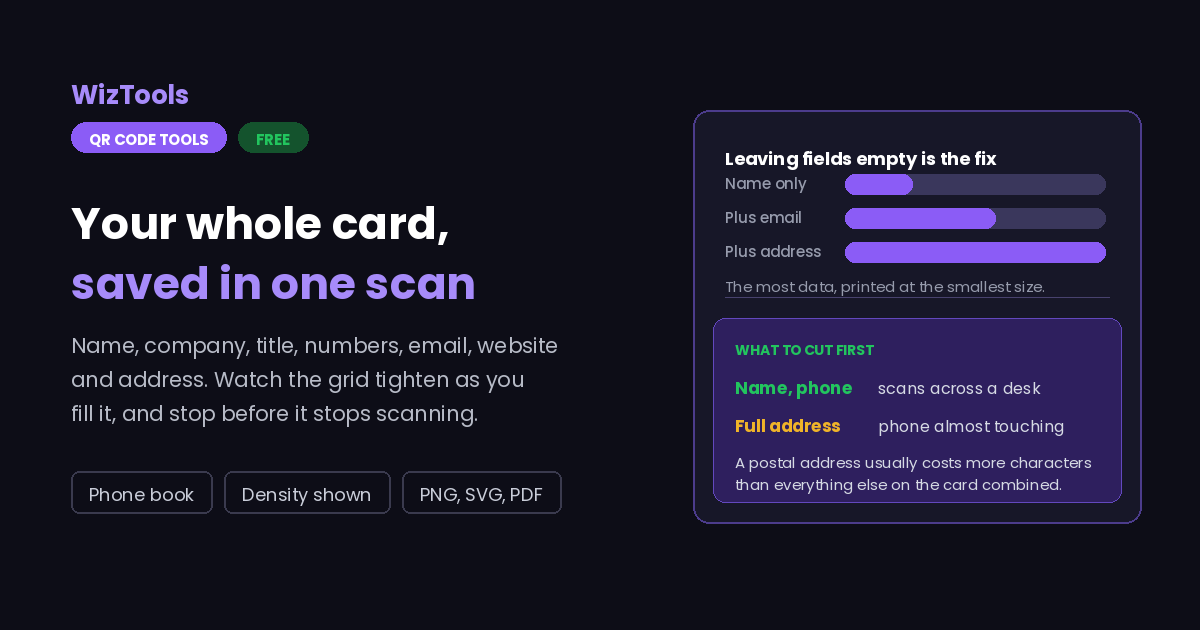
Every field is optional. Name, one number and an email is a perfectly good card and makes a code that scans easily. Each extra field you fill makes the pattern finer, so treat the empty boxes as a feature rather than a checklist.
The pattern visibly tightens with every field. When it starts looking like dense static, you have passed the point where it will scan reliably from a business card. Take something out, usually the full postal address, which is the biggest item of all.
Colours, a logo and a frame all work here, but keep the contrast strong: a contact code is already dense, and a low contrast dense code is the combination that fails most often. The page warns you when the contrast is too weak.
On a business card, give it at least two centimetres square and a clear border. Download SVG so it stays sharp, then scan the printed card, not the screen, and check every field came through intact.
Key Features & Capabilities
Designed for speed, privacy, and precision.
Name, company, title, two numbers, email, website, address and a note.
The grid tightens as you fill fields, so you can stop before it stops scanning.
Written in the ordinary vCard format, so phones and address books accept it.
The same design controls as the full generator, gradients and frames included.
SVG keeps a dense pattern crisp, which matters more here than for any other type.
Your details are encoded in your browser. They are not stored or sent anywhere.
The One Real Problem With Contact QR Codes: Size
The more complete the card, the harder it is to scan.
About the vCard QR Code Generator
A vCard QR code holds an entire contact card inside the pattern. Scan it and the phone offers to add a new contact with your name, company, job title, numbers, email, website and address already filled in. It is the reason QR codes turn up on business cards, conference badges, email signatures and shop fronts: it replaces the moment where someone types your details in wrongly, or does not bother.
Unlike the other types here, this one has a genuine engineering tension built into it. The more complete you make the card, the more data goes into the pattern, and the finer the grid becomes. A contact code is typically printed at the smallest size of any QR code, on a business card, and the two facts pull against each other. A sparse card with a name, one number and an email scans from across a table. A card with every field filled in, including a four line postal address, can need the phone almost touching the paper.
So the advice for this type is the opposite of the usual instinct: leave fields empty. Decide what someone actually needs in order to reach you and encode only that. The postal address is nearly always the first thing to cut, because it costs the most characters and is wanted the least. The preview tightens visibly as you type, which makes the trade-off easy to see while you are still deciding.
Everything is encoded in your browser. Your name, numbers and address are never uploaded, logged or stored here, and the file you download is complete in itself: no account behind it, nothing to expire, and no service that can stop working and take your card with it.
Frequently Asked Questions
Everything you need to know about the QR Code Generator.
Related Tools
Every Other QR Code Tool
15 more tools in this set. All free, all in your browser.