


Free Online Location QR Code Generator for Maps and Directions
Scanning opens the map at the point you set, ready for directions. Coordinates give an exact pin, which matters for a gate, a site entrance or a venue a postal address does not find. A place name works when you do not have them. Built in your browser, nothing uploaded.
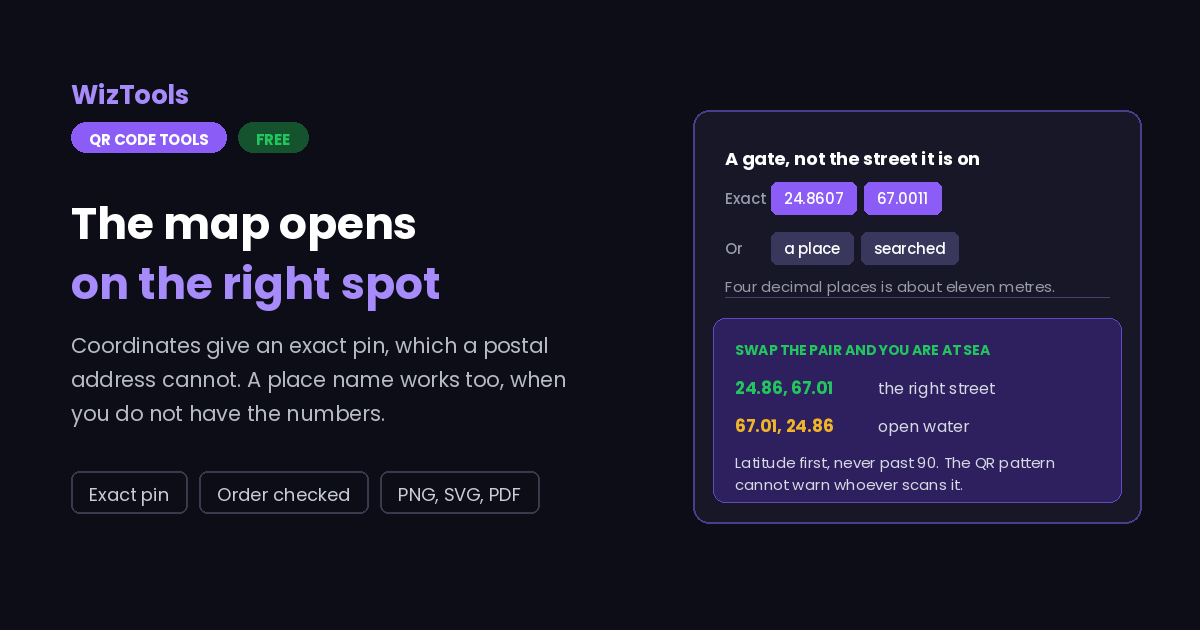
Opens Google Maps at an exact point. Use coordinates for precision, or a place name if you do not have them.
Need more than one kind of code? The all in one generator has all twelve types on a single page, and keeps your colours, logo and frame when you switch between them.
Scanners read contrast, not colour. Keep dark dots on a light background, because reversing it stops many phones from scanning.
Finish
Gradient and frame, for posters and table tents.Enjoying WizTools123? Help keep our server infrastructure 100% free and open for everyone.
Why Free QR Codes Expire, And Why These Do Not
The one thing worth understanding before you print anything.
| Static (this tool) | Dynamic (most free sites) | |
|---|---|---|
| What is inside the code | Your actual data | A short link to their server |
| If the company shuts down | Still works | Every printed code stops working |
| If they start charging | Nothing changes | The code can be switched off |
| Change the destination later | No, print a new one | Yes, this is the real advantage |
| Who sees who scanned it | Nobody | They do, with scan tracking |
| Works with no internet | For WiFi, vCard, text yes | Never, the link must resolve |
So the honest summary is this. If you need to change where a code points after it has been printed, or you need to count scans, you want a dynamic code and you should accept that it depends on a company staying in business. For everything else, which is most posters, menus, business cards, WiFi signs and product labels, a static code is the safer choice, because there is nothing in the middle that can fail.
How to Make a Location QR Code
Four steps from blank form to print-ready file.
Open the map, long press the exact spot and copy the pair it shows. That is far more reliable than a postal address for a gate, a car park entrance, a trailhead or a field, which addresses often place a street or two away.
Latitude is the north to south value, between -90 and 90, and it goes in the first box. Longitude runs -180 to 180 and goes second. Maps display them in that order, so pasted pairs are usually right, and the page flags a pair that cannot be valid.
If you do not have coordinates, write the place as you would search for it. The map then looks it up when the code is scanned, which is convenient but means the result depends on the search finding the right thing. Coordinates never move.
Add your colours, a logo and a caption such as "Directions here". Then scan the finished file and check the pin lands exactly where you meant, ideally from a phone that is not already standing at the location.
Key Features & Capabilities
Designed for speed, privacy, and precision.
Coordinates land on the spot, not on the street the postal address belongs to.
A latitude past 90 or a swapped pair is caught before the code is printed.
No coordinates to hand? Type the place and the map looks it up on scan.
The same design controls as the full generator, gradients and frames included.
PNG for screens, SVG for presses, PDF laid out ready to hand over.
The location is encoded in your browser. It is not stored or sent anywhere.
Coordinates or a Place Name, and Why the Order Matters
Four things that decide whether the pin lands where you meant.
24.86, 67.01 and you get a point hundreds of kilometres away, often in open water, and the code still looks perfectly fine. Nothing about the QR pattern can warn the person scanning it, so the check has to happen here, before it is printed.
geo: format that is the proper standard, and a maps link that behaves consistently everywhere. Phones vary in how they treat the first, so a link is the safer choice for printed material where you cannot control what the scanner is running.
About the Location QR Code Generator
A location QR code answers one question: where exactly is this. Scan it and the map opens at a point, ready for directions. It belongs on invitations, delivery notices, site signs, trailheads, event entrances and shop windows, anywhere the difference between the right spot and the roughly right spot wastes somebody fifteen minutes.
That is also why coordinates beat a postal address. An address resolves to a street, and a street can be long, gated, one way, or a different entrance from the one you meant. A coordinate pair is a point: the loading bay, the side gate, the pitch, the corner of the field. For anywhere that a map cannot name, it is the only option that works.
Two practical cautions. First, latitude goes first, and a swapped pair produces a perfectly valid code pointing at open water. Second, decimal places are precision: four is about eleven metres and finds the door, two is about a kilometre and finds the district. Copy the whole figure from the map rather than tidying it up.
A place name is offered as the alternative when you simply do not have coordinates. Understand what it does, though: the code stores a search, and the map decides what it means at the moment someone scans it. For a famous landmark that is reliable. For a small business whose listing might move or be duplicated, it quietly becomes someone else's problem later. Coordinates do not change.
Frequently Asked Questions
Everything you need to know about the QR Code Generator.
Related Tools
Every Other QR Code Tool
15 more tools in this set. All free, all in your browser.